How Claude Memory Works: The Three Pools and How to Set Yours Up
Last updated August 2026
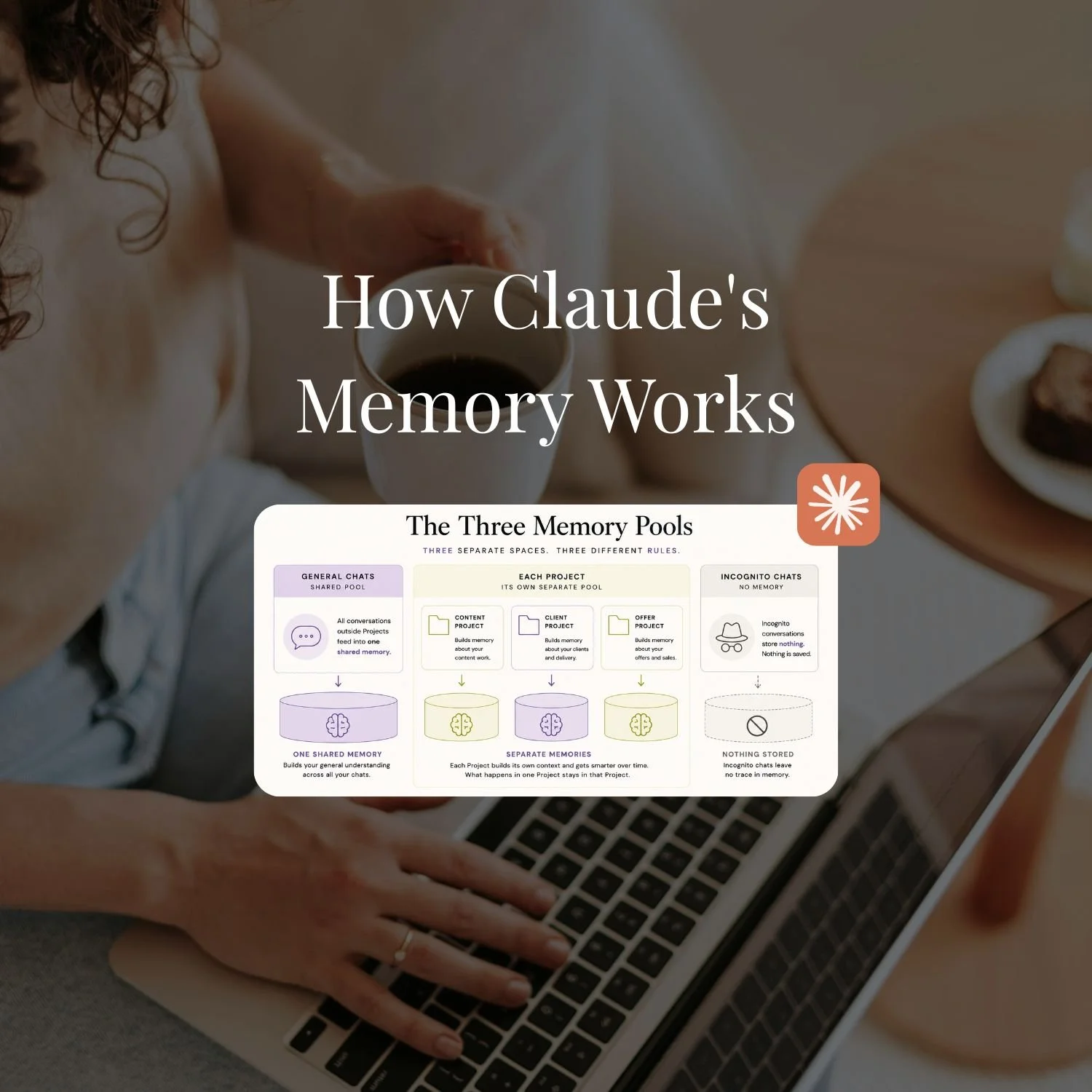
We tell Claude things all day. Our offers, how we like responses formatted, the project we're in the middle of, and the way we want to be spoken to. And it's easy to assume all of that is going into one "big brain", so that wherever you open Claude, it just knows you.
That's not quite how it works. At least, not the way most people picture it.
Claude actually keeps several separate memory spaces, it updates while you're talking to it rather than waiting around, and there's a layer of what it will and won't remember without you saying so. Once you see the actual shape of it, the things that used to feel like Claude being inconsistent make complete sense.
So here's what this post actually is: how Claude's memory actually works, and how I've set mine up to get the most out of it.
Claude's memory works in three separate spaces: a shared pool for chats outside Projects, a separate pool for each Project, and nothing at all for incognito chats. The shared pool now reaches into Claude Cowork too, updates happen in real time instead of on a daily cycle, and sensitive topics are left out unless you switch that on yourself.
TL;DR:
Claude's memory now works across chat and Cowork, not just one or the other. Tell Claude something in a normal chat and it can already be there when Cowork runs a task for you, and the other way around.
The old 24-hour wait is gone. Claude used to review your conversations once a day and update memory in a batch. It now reads and updates memory while you're talking to it.
Health, race, religion, political views and gender identity are left out of memory by default. There's a toggle if you want Claude to remember them anyway, but it stays off until you turn it on.
Memory and Preferences still aren't the same system. Preferences is where "always" language forces something to apply every time. Memory is always weighed for relevance, no matter how you phrase it.
Project memory still compounds the more you use a Project. That part hasn't changed, and it's still the strongest argument for working inside the right Project instead of a general chat.
New here? This blog is for the solo founder who wears every hat in the business, and wants real AI systems and workflows running things, not just piecing it together in the chat. Start here →
How Claude's Memory Actually Works (Updated for the August 2026 Change)
Claude Updated the way their memory works in August 2026 and it was a pretty big change because the mechanism itself shifted, not just a setting on a page somewhere.
The way that it works is that Claude builds a picture of you over time from the accumulation of your conversations. It's not storing a list of facts word for word. It's synthesising your business context, your preferences, your communication style and what you're working on into a running understanding of who you are. That part hasn't changed.
What changed is how fast that picture updates, and where it reaches. Until recently, Claude reviewed your conversations in a batch, roughly once every 24 hours, and only really "knew" you inside chat. Tell it something in the morning, and a brand new conversation that afternoon might not have caught up yet. Anthropic fixed the speed on 10 July 2026, and the reach on 25 August 2026. Memory updates as you talk now, and it reaches into Claude Cowork too, not just chat.
"Faster and wider" doesn't tell you much on its own, so let's get into what that actually looks like.
The Three Memory Pools (And Cowork Just Joined One of Them)
Claude still doesn't have one memory. It has three separate spaces, and knowing which one you're writing into is most of what "setting memory up properly" actually means.
General chats and Cowork now share one pool. Any conversation outside a Project, whether that's a normal chat or a Cowork task, feeds the same shared memory. Tell Claude something in a chat on Monday, and Cowork can already know it on Tuesday when it runs a task for you. That's the genuinely new part: before 25 August 2026, chat and Cowork didn't talk to each other at all.
Each Project keeps its own separate memory space. A content Project builds context about your content, a client Project builds context about that client, and neither leaks into the other. This hasn't moved.
Incognito chats still store nothing. Nothing from an incognito conversation reaches memory in chat, and that should hold true in Cowork as well, though Anthropic's materials don't confirm it explicitly for the new synced setup.
The practical implication is bigger than it used to be though. If you're doing real setup work for your business in chat, that context now shows up when you hand a job to Cowork, without you re-explaining it. If you want something to stay contained to one area of your business, a Project is still the way to do that, not incognito, and not hoping general memory stays narrow on its own.
Why Did Claude Take 24 Hours to Remember Things? (It Doesn't Anymore)
Here's what actually happened to a SheScales member a few months back, and why it doesn't happen anymore.
She told Claude something important in a conversation. Claude confirmed it there and then, which it's always done inside a single chat. She opened a new conversation a few hours later, and it wasn't there yet. Nothing was wrong. Claude's automatic memory used to run on a roughly 24-hour cycle: it reviewed your recent conversations in the background, once a day, and folded whatever mattered into its understanding of you. Explicit memory commands ("remember that...") were the exception, updating in real time. Everything else waited for the next cycle.
As of a 10 July 2026 update, that daily batch is gone. Memory is now built from individual entries that Claude reads and updates while you're talking to it, not reviewed in bulk overnight. If that member had the same conversation today, a new chat that afternoon would already know it.
Why I think this is a genuine improvement, and not just a change: the old delay existed to stop Claude latching onto a throwaway comment or a one-off request and treating it as permanent. Individual, editable entries solve that a better way. If Claude picks up something you didn't mean to teach it, you don't have to wait a day for it to fade. You open memory and delete the one entry that's wrong, on the spot. Exactly where, next.
What Won't Claude Remember Unless You Say So?
This update is genuinely exciting to me!
According to Anthropic's announcement, as of 25 August 2026, Claude leaves a specific list of things out of memory by default: health conditions, race, ethnicity, religious beliefs, political views and gender identity. There's a toggle in Settings, labelled "Include sensitive topics in memory," that switches this off (meaning: lets Claude start remembering them). Until you turn it on, none of it gets stored, even if it comes up naturally in conversation.
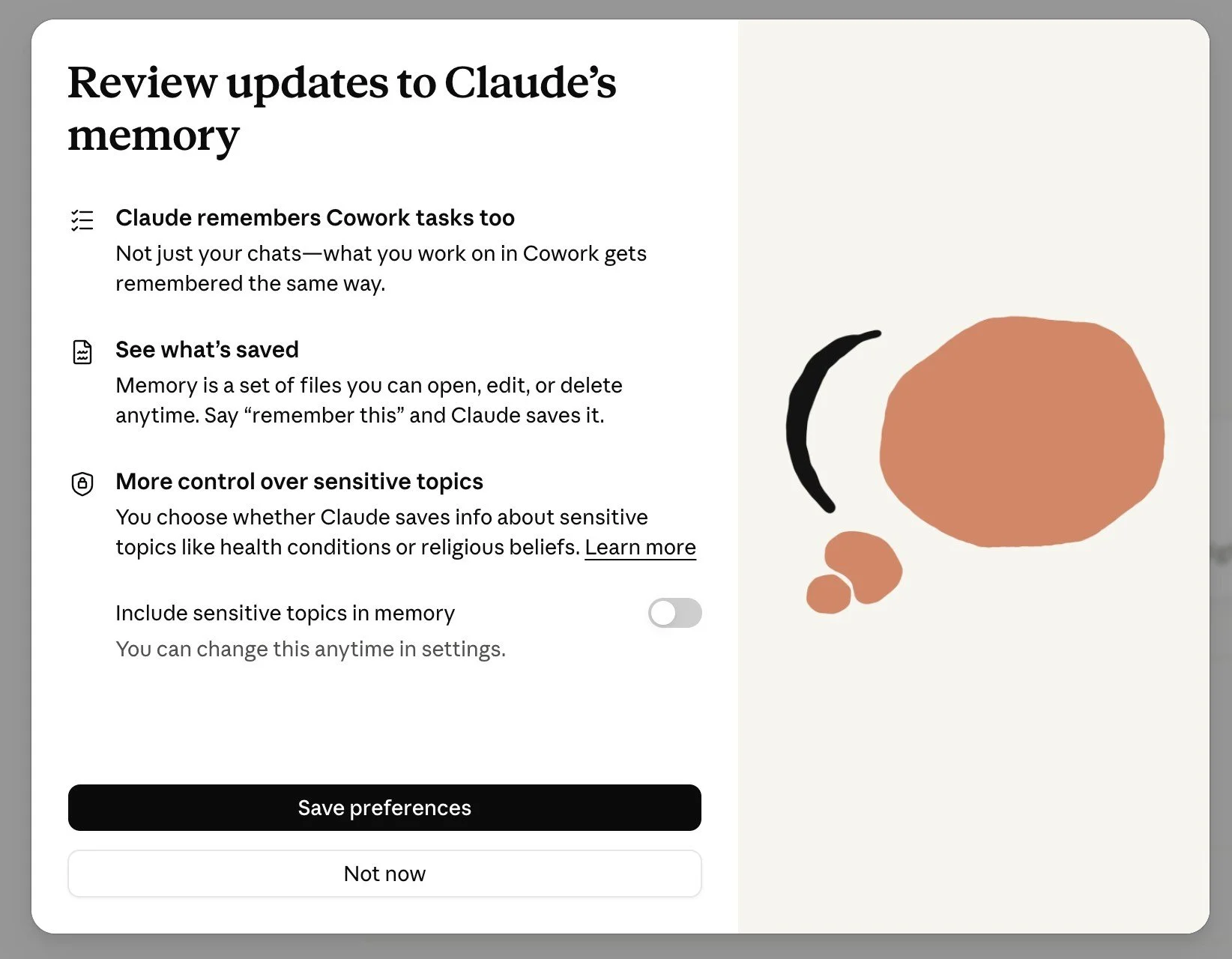
I left mine off. Not because I think Claude would misuse that information. Because I think those things should stay private by default, and a setting you have to actively switch on is a much better default than one you have to remember to switch off.
Claude also won't store certain things regardless of that toggle: government ID numbers, criminal history, and immigration status stay out of memory no matter what you've switched on.
The other thing that shipped alongside this: memory now shows up in Settings as a set of files, ones you can open, edit or delete individually, rather than one block you have to trust wholesale. Exactly where to find that, next.
Is Memory the Same Thing as Preferences?
No, and mixing them up is the single most common setup mistake I see. There are two separate settings features doing two different jobs.
Memory, under Settings > Memory, is always relevance-weighted. That's true whether Claude picked something up automatically or you told it to remember something directly. Store "I have a membership called SheScales" and Claude brings it up when your business is relevant to what you're asking. Ask it to help draft a contract and it won't drag SheScales into that unnecessarily. That's correct behaviour, not a bug, and no amount of phrasing changes it. Memory doesn't have a setting that forces something to apply every single time.
Preferences, under Settings > Profile, works differently. This is where phrasing genuinely changes the outcome. Write an instruction using "always," "for all chats," or similar, and it gets applied unconditionally, every conversation, no weighing required. Leave that language out and a stated preference gets treated more like a contextual detail, weighed for relevance the same way memory is.
So if something needs to be non-negotiable for you, like always writing in Australian English, it belongs in Preferences, not memory. Store it as a memory instead, even worded as a rule, and Claude will still decide whether it's relevant to what you're asking before applying it.
The fix: audit what's sitting in each. Anything you've stored in memory hoping it applies every time probably needs to move to Preferences instead.
How to View and Manage Your Memory Settings
You can see everything Claude has stored about you: Settings > Memory.
That page shows memory as a set of files, organised by topic, that you can open, edit or delete one at a time. It's no longer one block you have to take on faith. You'll see everything Claude has picked up from your conversations (outside of Projects) and everything you've explicitly stored, across chat and Cowork.
To add a memory: tell Claude directly ("remember that I always want responses in Australian English") and Claude confirms it's stored. Or let Claude pick things up automatically from your conversations. Both work. The explicit instruction is faster and more precise.
To delete a memory: open the topic it's sitting under and remove it. If your business has changed, your offers, your audience, your tools, outdated memory actively works against you. Claude will keep applying information that's no longer accurate until you clear it out.
My rule of thumb: do a memory audit every three months or any time something significant changes in your business. Stale context is worse than no context.
How to View and Manage Your Project Memory
Each Project keeps its own memory, built from the conversations inside that Project, and you manage it from within the Project itself rather than from your main settings.
Open the Project, and its memory controls sit in the panel.
This means you can clean up or reset what one Project knows without touching the others. If your content Project has built up memory from an old strategy you've moved on from, you can clear that Project's memory and let it rebuild from your current approach, while your client Project carries on untouched.
A couple of things worth knowing about how Project memory behaves:
It only builds from conversations inside that Project. A chat you have in general Claude, or in a different Project, doesn't feed this Project's memory. That's the whole point, it stays specific to the work you do there. Cowork inherits the general pool, and Project memory appears to stay just as contained from it as it did before the sync, though Anthropic hasn't confirmed that specific interaction directly, so it's worth testing in your own account rather than assuming.
It compounds the more you use the Project. The longer you work inside a Project, the sharper its understanding of that part of your business gets. This is the real argument for doing your content work in your content Project, your client work in your client Project, and not defaulting to general chats for everything. Every Project conversation is building intelligence exactly where it belongs.
My rule of thumb extends here too: when something significant changes in how you approach a specific area, audit that Project's memory, not just your general memory. If you've overhauled your content strategy, the content Project is the one to review. Stale context is worse than no context, and that's true per Project, not just globally.
How I've Set Mine Up
I used to think about this in two layers. Now I think about it in three, because the rules layer isn't actually memory at all.
The rules live in Preferences, not memory:
Australian English. No em dashes. Short paragraphs, active voice, direct address. I don't want Claude weighing these for relevance; I want them applied every single time, no exceptions. That only happens because they're written into Settings > Profile using language like "always," not because I mentioned them once in a chat or let them sit in memory.
I've also got a rule about uncertainty in there: if Claude isn't sure about something specific to my business, ask rather than assume. Same logic. Not a preference I hope gets applied, one I need applied every time.
The business context lives in general memory:
My business name, my primary offers, the broad strokes of who I serve. Some of this built up automatically from conversations. Some of it I've told Claude directly; I've got nine explicit memory edits sitting in there right now. Either way, it's the kind of thing that only needs to surface when it's relevant, which is most of what general memory is for. Any general chat I open already has that baseline, without me re-introducing myself.
One mechanical thing worth knowing since the sync landed: whatever sits in that general layer now reaches Cowork too. A Cowork task inherits the same business-context baseline my chats do. I haven't had to rebuild anything to make that true. It just is now.
The specific stuff lives in Project memory:
Blog methodology, email voice, content pillars, my exact approach for each offer. Too precise to be useful everywhere, so I let it build inside the relevant Project instead. The Blog Intelligence Project knows my internal linking rules. The SheScales Project knows my delivery style and my member community. Each one gets sharper the more I actually use it.
The thing I'd do differently starting from scratch: set up Preferences first, not memory. That's the layer that changes behaviour immediately and consistently. Memory builds itself anyway, whether you set it up deliberately or not.
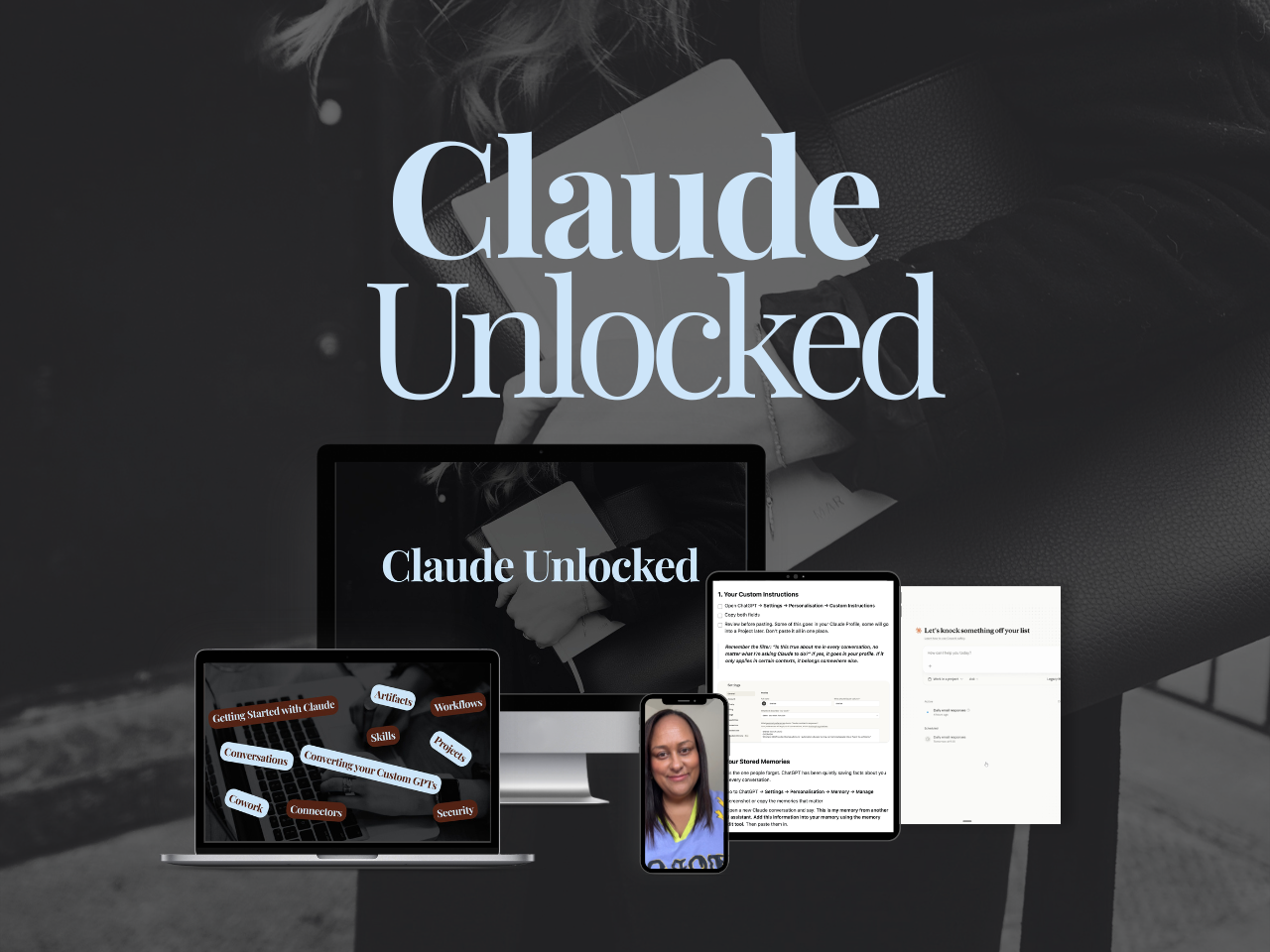
If you want to go past the setup and build Claude into a proper business system - Projects configured for your specific use cases, Skills that run your recurring work, Connectors that link Claude to the tools you already use, tasks running without you sitting there watching - that's what Claude Unlocked covers.
It's the fastest way to move through the 4 stages of using Claude as a solo founder.
It's $47 for a limited time and takes an afternoon to complete.
Key Takeaways
The short version of everything above:
Claude memory is still three separate spaces, and general chats and Cowork now share one of them. Use the right one for what you want to build.
Memory updates in real time now, not on a 24-hour cycle. The daily wait that used to explain most "why doesn't Claude remember this?" moments went away on 10 July 2026.
Sensitive topics stay out of memory unless you turn that on yourself. Health, race, religion, political views and gender identity are excluded by default.
Know where your rules actually live. Memory is relevance-weighted, always. Preferences is where "always" phrasing forces unconditional application. Put your non-negotiables in Preferences, not memory.
Project memory compounds. The more you use a Project, the smarter it gets about that specific domain, and it appears to stay just as contained from Cowork as it always has, though that specific point isn't something Anthropic has confirmed directly.
Audit your stored memory regularly. Outdated memory works against you. Review it every few months or any time something significant changes in your business, and remove what's no longer accurate.
FAQs
Does Claude's memory work the same on mobile, desktop and Cowork?
Yes. Memory is tied to your Claude account, not the device or the surface you're using it on. Whatever's stored is available across web, mobile and desktop, and now Claude Cowork too, since the August 2026 update synced memory across chat and Cowork. The pool rules (general, Project, incognito) apply the same way everywhere.
What's the difference between Claude's memory and Project instructions?
Project instructions are what you explicitly write for Claude to reference in every conversation inside a Project: your brand voice, your business context, your rules. They're there from the first message, every time.
Memory is what Claude builds over time from your conversations. It applies more broadly, across contexts and platforms, and it builds automatically. The two work together: instructions give Claude the fixed context it needs for that specific workspace, memory gives Claude the accumulated understanding of how you work overall.
How is Claude's memory different from ChatGPT's?
Both are selective about what they keep, so neither saves every single thing you say. Until recently the clearest difference was timing: Claude updated on a daily cycle, ChatGPT felt close to instant. That gap closed on 10 July 2026, when Claude moved to real-time memory entries.
The more useful comparison now is what each one shows you and lets you control. Claude's memory sits in Settings as individual, editable files, and specific sensitive topics are excluded unless you opt in. If you're weighing the two platforms more broadly, how I use both covers where they actually differ.
Does Claude's memory sync between chat and Cowork?
Yes, as of the 25 August 2026 update. Anything in your general memory pool (chats outside a Project) is available to Cowork, and anything Cowork picks up while running a task feeds back into that same pool. Project memory appears to stay separate either way, though Anthropic's own materials don't spell out how Project memory and Cowork interact specifically, so treat that part as the likely read rather than a confirmed one.
Can I see everything Claude has stored about me?
Yes. Settings > Memory shows everything Claude has stored, organised as individual topics you can open, edit or delete one at a time. Nothing is hidden, and nothing requires you to clear the whole thing just to fix one wrong detail.
Does Claude leave sensitive information out of memory automatically?
Yes. Health conditions, race, ethnicity, religious beliefs, political views and gender identity are excluded from memory by default. A toggle in Settings lets you include them if you want to, but it stays off until you turn it on. Government ID numbers, criminal history and immigration status are excluded regardless of that setting.
Do I need a paid Claude plan to use memory?
No. Claude memory was activated for all accounts, free and paid, in March 2026, and it's on by default for Free, Pro and Max. Team and Enterprise accounts work differently: an admin has to switch it on before anyone on the account gets it. Where Pro makes a difference is the depth of context Claude can carry within a conversation, and access to Projects and Skills.
Ready to Set Up Claude Properly?
Memory is one layer of a well-built Claude setup. Projects, Skills, and Connectors are the others, and when all four are working together, Claude stops being a chat tool and starts running real parts of your business.
This matters most when you are pressure-testing something new and need honest answers rather than encouragement. How to Start a Business With Claude puts that to work before you have customers.
Claude Unlocked covers the complete setup: memory, Projects, Skills, Connectors, and how to build Claude into a system that actually knows your business.
It's $47 and the most direct way to do this properly without spending hours figuring it out alone.
Not ready for that yet?
The free Claude Setup Kit covers the settings most people miss when they start using Claude. This free kit walks you through the full process, from turning on the right settings to understanding how Projects, Skills, and connectors work.
It also includes the exact prompt to export your ChatGPT memory so you're not starting from scratch. It's the guide I wish I had when I started.

MEET THE AUTHOR

HEY, I'M SHERISE
I'm an AI strategist and educator based on the Central Coast of NSW, Australia. I help solo founders install AI systems that scale their business without scaling their workload and remove low-value work from their business so they can spend more time in strategy, creativity, and the work that actually moves the needle.
I run SheScales, the AI implementation community built for the person who IS the business and the whole team. I'm the founder behind 40+ AI assistants across ChatGPT and Claude, the Brand Playbook App, and a growing library of skills and systems used daily by hundreds of solo businesses.
I teach the Architect Method: the shift from chatting with AI to giving AI a job. It's the thinking framework for spotting where AI can genuinely help in your business, knowing how to architect the system, and deciding whether something should be a Skill, a Project, a GPT, an automation, a combination of these, or stay manual.
I'm not here to inspire you. I'm here to hand you the architecture.