OpenAI Is Retiring Custom GPTs: What Happens to Yours
Last updated October 2026
When this space first started we were all ChatGPT-focused, and Custom GPTs were the whole conversation. A lot of us built real parts of our businesses inside them, mine included.
So this one is personal.
Yes, OpenAi is retiring Custom GPTs, which I know will be alarming to you if you’ve built your AI operation on them, or purchased Custom GPTs from others.
They are scheduled to stop running on 11 December 2026, and OpenAi have given us a way to convert them into plugins instead.
It’s also not really about GPTs. The useful part of this news is what it should make you go and check about everything else you have built.
Anything you build on a platform you don't own can be taken away on someone else's timeline, and the fix isn't picking the platform that will never do it, because none of them promise that.
OpenAI is retiring Custom GPTs on 11 December 2026 and migrating them to plugins. Your existing GPTs keep working until then, your instructions carry across as a skill inside the new plugin, and your custom actions do not transfer at all.
TL;DR:
Custom GPTs stop running on 11 December 2026, and new ones can't be created from around 25 September 2026. Existing GPTs keep working right up until the retirement date.
The replacement is a plugin, and your GPT's written instructions carry across as a skill inside it. Connected apps come too.
Custom actions do not transfer, full stop. If your GPT called an external tool, somebody has to rebuild that integration by hand.
Once you migrate, the original GPT becomes read-only and you can't delete it. Finish any edits before you press the button, not after.
The real lesson isn't "move to a different platform". It's whether you could walk out of any tool you use in an afternoon, which is a documentation habit rather than a platform choice.
New here? This blog is for the solo founder who wears every hat in the business and wants real AI systems and workflows running things, not just piecing it together in the chat. Start here →
Here’s what we’ll be covering:
What Is Actually Happening to Custom GPTs?
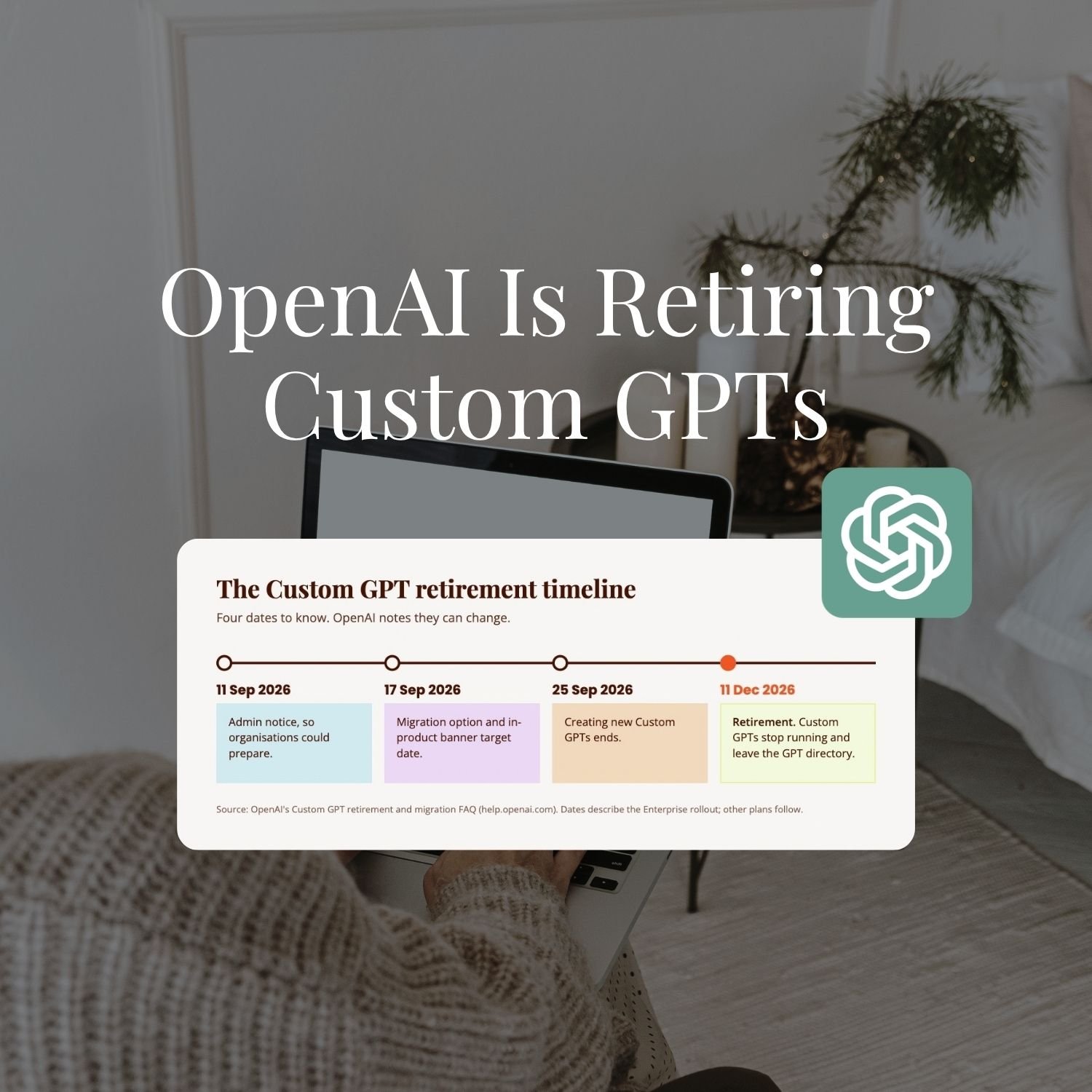
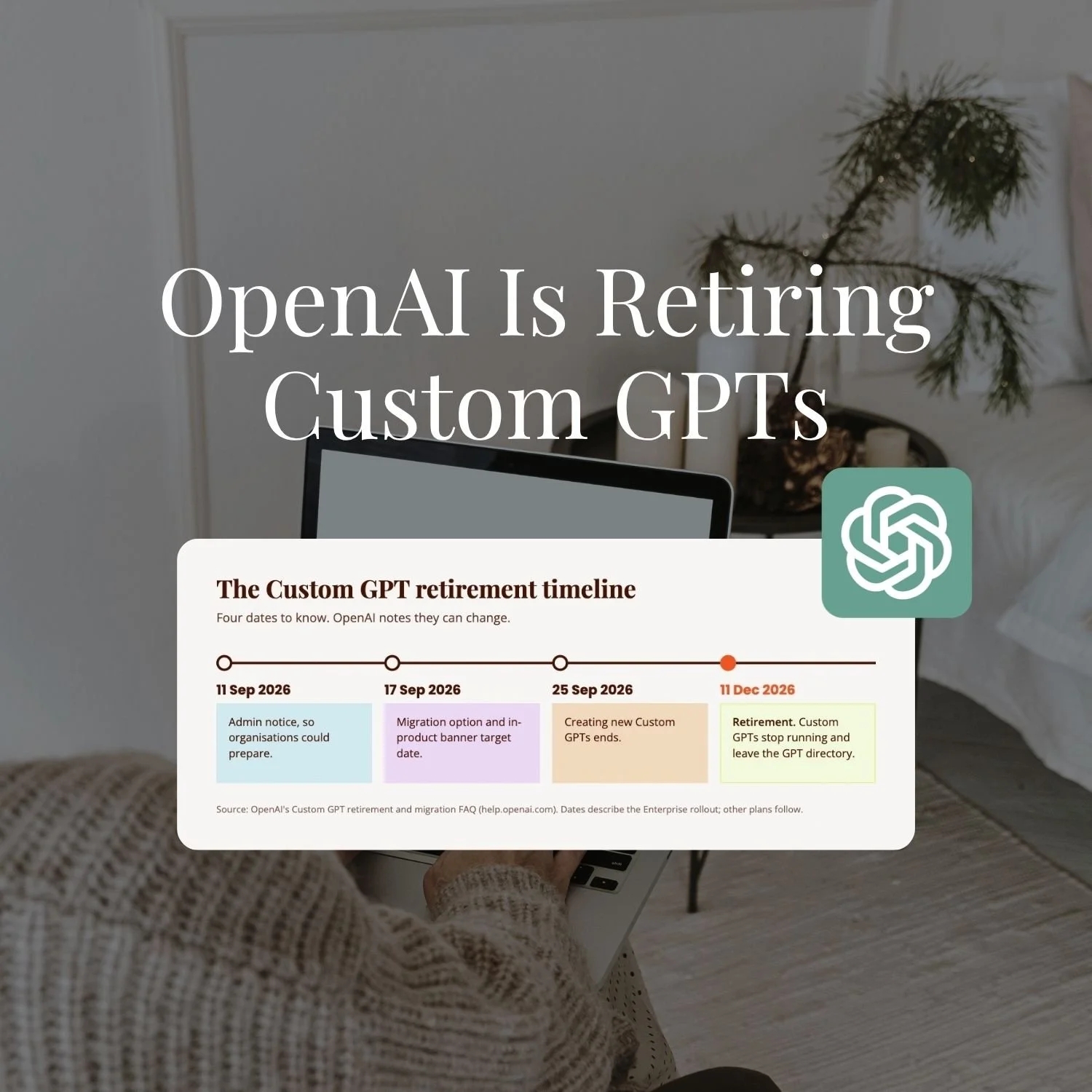
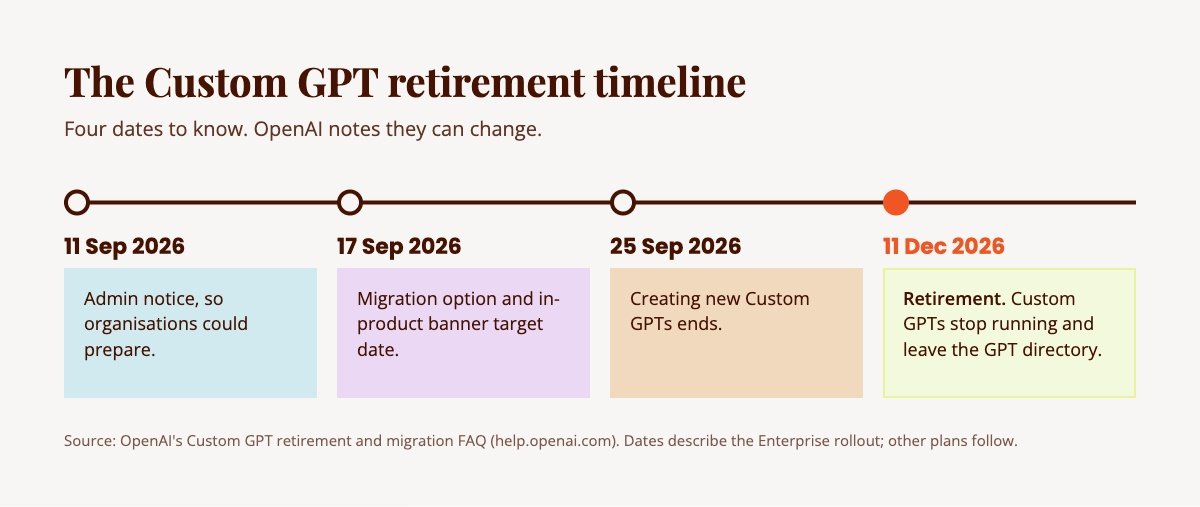
OpenAI is retiring Custom GPTs and replacing them with plugins, on a timeline that's already running. The dates are published in OpenAI's own Custom GPT retirement and migration FAQ, and the detailed ones describe the Enterprise rollout, with other plans following on a coordinated timeline.
The milestones, as they stand:
11 September 2026: admin notice, so organisations could prepare.
17 September 2026: target for the migration option and the in-product banner appeared.
25 September 2026: creation of new Custom GPTs ended.
11 December 2026: retirement. Custom GPTs stop running and leave the GPT directory.
OpenAI notes the dates are subject to change. The direction is not.
A plugin, in OpenAI's own framing, is a bundle. It can hold skills, which are written instructions for a repeatable job, and it can hold apps and connections to outside systems, packaged together in one place. So a GPT's instructions don't disappear. They become a skill sitting inside that bundle.
If you've read my post on Claude Skills versus Custom GPTs, that word will look familiar. Both platforms have landed on the same shape: a written instruction file that gets pulled in when it's relevant. Interesting that they got there separately 👀
One thing to do this week if you have GPTs you rely on: write down which ones matter, who built each one, and what each one actually does. That list is the thing migration needs, and it's useful whether you migrate or not.
What Actually Breaks When a Platform Retires What You Built
The instructions are the easy part. It's everything wrapped around them that costs you.
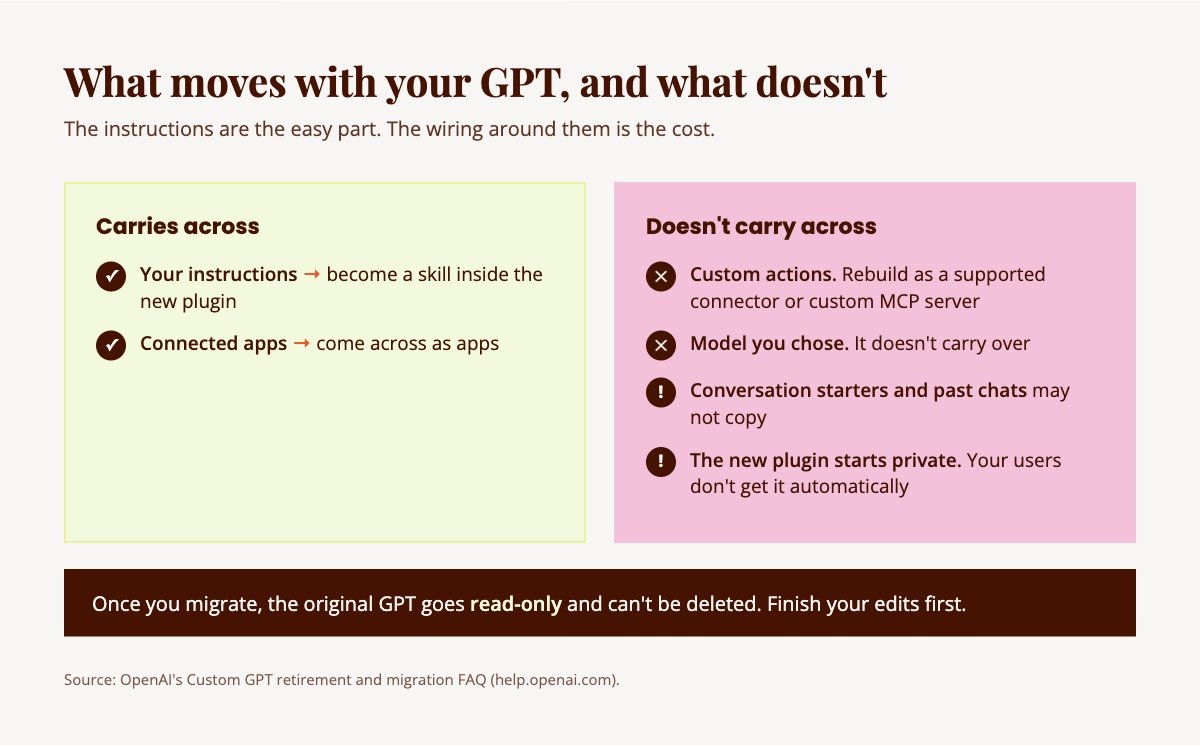
OpenAI is clear about what does and doesn't survive the move. The instructions become a skill. Connected apps come across as apps. After that:
Custom actions do not transfer. A custom action is the bit that let your GPT reach outside ChatGPT and do something in another tool, look up a record, hit an API, fetch live data. Those have to be rebuilt as a supported connector or a custom MCP server, and OpenAI says plainly that a rebuilt integration shouldn't be assumed to do everything the original did.
Conversation starters and previous chats may not copy.
The model you chose doesn't carry over.
The replacement plugin starts private, so anyone who used your GPT doesn't automatically have the new thing.
Once you migrate, the original goes read-only and its creator can't delete it.
The instructions were the part you could have retyped in 20 minutes. The custom action is the part that took someone a weekend and a lot of swearing, and that someone was probably you.
That's what actually breaks. Not the tool. The time you spent learning it, the workarounds you built around its quirks, the people you told to use it, and the integration nobody documented because it was working fine.
MCP is worth knowing by name, since it's where OpenAI's own guidance points for rebuilt integrations. It's an open standard for connecting an AI tool to outside systems, rather than a format belonging to one company, so an integration rebuilt that way is less tied to whoever you built it for.
The Question This Should Make You Ask About Everything You've Built
Could I walk out of this tool in an afternoon, or would I be starting over?
That's the question, and it applies to everything, not just GPTs. Your Projects. Your Skills. Your automations. The scheduled tasks running before you open your laptop. The prompt you've refined 40 times and never saved anywhere except the chat you ran it in.
Most can't answer it, because we've never had to. The build works, so we stop thinking about it. Then a date lands in a help centre article and suddenly the answer matters a lot 😬
Run it across your own setup. For each thing you've built, ask where it actually lives. If the only copy is inside the platform, then the platform owns your work, and your ability to move is whatever the platform decides to give you.
This is the sort of thing we pull apart together inside SheScales, piece by piece, including the unglamorous bits like where the backup actually lives and what happens when a platform changes underneath you.
How I Keep My Own Builds Portable
I refuse to be locked to one platform. That's the actual reason behind a system I've had running for a while now: every Skill, every Project instruction, every scheduled task I activate, every GPT gets backed up into Notion automatically, with version history. It’s also being backed up to GitHub daily.
Not only that, but I have a while AI-HQ folder structure right on my laptop that I can point any LLM at and it will know my business right away and be able to jump in and get to work.
Because of this, I’ll never again be in a position where I have to start over on a platform, and that’s what I teach everyone in SheScales how to build for themselves too.
And this matters more now than it did two years ago. When this space started, we were all ChatGPT-focused and building Custom GPTs. That's changed.
There's always going to be a new player, and if we want to be able to move, it needs to be easier than it was the first time we moved.
What Does Building Portable Actually Look Like?
Nobody is asking you to build everything twice. What this comes down to is a documentation habit, and it is far less work than it sounds.
What it actually means, in practice:
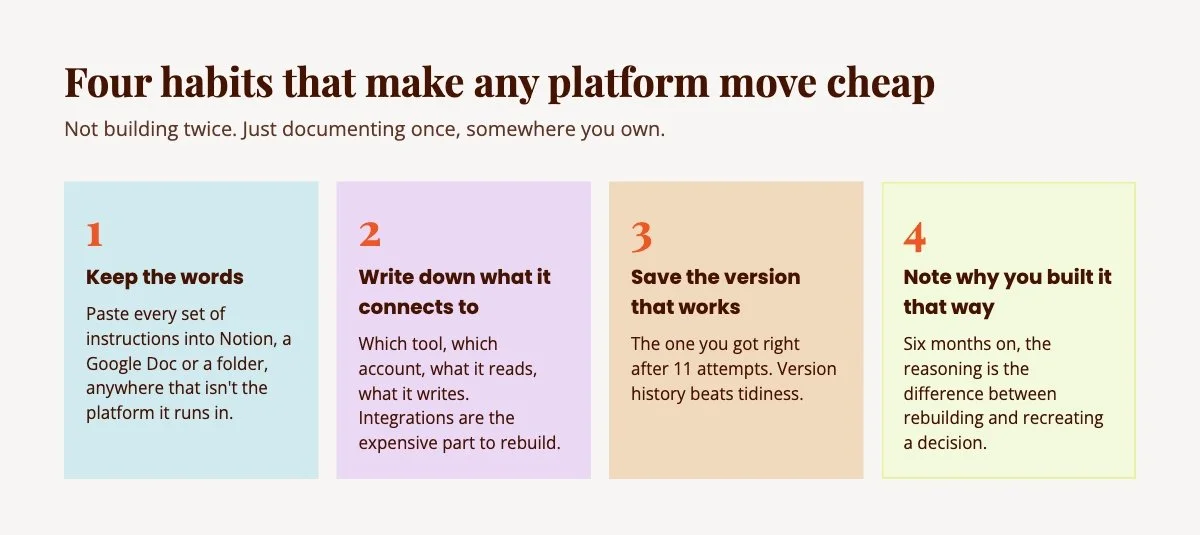
Keep the words somewhere you own. Every set of instructions you write, whether it's a GPT, a Claude Project, your business context, SOPs, or a Skill, exists as text. Text is the portable bit. Paste it into Notion, a Google Doc, a folder on your laptop, anywhere that isn't the platform it runs in.
Write down what it connects to, not just what it says. The integrations are the expensive part to rebuild, and they're the part nobody documents. Which tool, which account, what it reads, what it writes.
Save the version that works. When you finally get the output right after 11 attempts, that's the version worth keeping. Version history matters more than tidiness here.
Note why you built it that way. Six months later you won't remember why a step exists, and that reasoning is the difference between rebuilding it and recreating a decision you already made.
None of that is hard. It's just the sort of thing that loses to a busy week, every time, until the week you need it.
All of this is easier when the setup underneath it is right in the first place.
The free Claude Setup Kit is the version of that I'd hand a friend starting today: what to set up, in what order, and how to get the best out of Claude.
Does This Mean You Should Leave ChatGPT?
No, and anyone telling you to switch platforms over this is selling you the same problem in a different colour.
This is the comparison you probably arrived with, so let's do it properly. If you're reading about Custom GPTs being retired, the obvious next thought is whether Claude is the safer place to build.
I use Claude every day and I teach it, so you'd expect me to say yes.
I'm not going to. Claude is not immune to this and Anthropic has never promised otherwise, because no platform anywhere promises that what you build today will still run in three years. The safety you're looking for doesn't exist as a product.
What you can control is the exit cost. A tool you can leave in an afternoon is a tool you can commit to properly, and honestly it makes you braver about building. The fear of being trapped is what keeps people building nothing.
So: stay on ChatGPT if it suits you. Migrate your GPTs. If you're moving to Claude anyway, I've written the step-by-step for getting a Custom GPT into a Claude Project. Just do whichever one you do with a copy of the words saved somewhere else.
The thinking is the part that transfers regardless of what the platforms do next. Knowing how to spot the job, brief it properly and decide what shape it should take is not a ChatGPT skill or a Claude skill, and it's what I mean by becoming an AI architect rather than a power user of one app.
What to Do Next
If you've got Custom GPTs you rely on that you built yourself, the sequence is short. List them. Save the instructions somewhere outside ChatGPT today. Note which ones use custom actions, because those are the ones that need real work. Then migrate and test it properly before you tell anyone else to switch.
If this whole thing has made you realise you've been building in a way you can't move, that's a genuinely useful thing to find out now instead of later.
And if you are sitting there realising you have no idea where half your instructions live, you are in very good company. I have been there. It is a couple of hours of unglamorous copying and then it is done, and you never have to feel this particular way about a help centre article again.
SheScales is my AI implementation community, built for the person who IS the business and the whole team. Each month I build a real system inside my own business, pull it apart, explain every decision, and hand over every component so you can build your version. What we're building is the way you think about the work, which is the part that survives a platform changing its mind, rather than a set of buttons in one app that might not exist next year.
Key Takeaways
The short version of everything above:
The retirement date is fixed: Custom GPTs stop running on 11 December 2026, and they keep working right up until then.
Your instructions carry across: A GPT's written instructions become a skill inside the replacement plugin, which is why saving a copy somewhere you own matters.
Custom actions don't transfer: Any external tool your GPT called has to be rebuilt by hand as a supported connector or a custom MCP server.
Migration can't be undone: Once you migrate, the original GPT becomes read-only and can't be deleted, so finish your edits first.
Documentation is your real safety net: Keeping your instructions, integrations and reasoning somewhere you own means a forced move costs you an afternoon on any platform.
FAQs
What actually happens to my existing Custom GPTs?
They keep working until 11 December 2026, when they're scheduled to stop running and leave the GPT directory. Nothing disappears before then. OpenAI's plan is that links to migrated GPTs redirect to the replacement plugin for people who already have access to it, though a redirect doesn't grant access on its own.
Do I need to move everything today?
No. The useful thing to do today is preparation rather than migration: identify which GPTs you actually rely on, save their instructions somewhere outside ChatGPT, and note which ones use custom actions. Migration isn't available everywhere yet, and OpenAI's own guidance is to migrate and test when the option reaches your account.
What doesn't transfer when a Custom GPT is migrated?
Custom actions don't transfer and have to be rebuilt as a supported connector or a custom MCP server. Conversation starters and previous chats may not copy, and the model you selected doesn't carry over. Instructions become a skill inside the new plugin, and connected apps come across as apps.
Can I still edit my GPT after migrating it?
No. Once a GPT is migrated the original becomes read-only, and its creator can't delete it either. Finish any edits you care about before you migrate, then maintain the replacement plugin from that point on.
Is this going to happen on other AI platforms too?
Probably, at some point, in some form. No platform has promised otherwise. That's the argument for keeping your instructions, your integrations and your reasoning documented somewhere you control, so a change to any platform costs you some re-pointing rather than a rebuild.
Does this affect me if I'm not on an Enterprise plan?
The transition affects all ChatGPT plans. The published dates describe the Enterprise rollout, and other plans are expected to follow the same timeline with their own in-product announcements. One thing worth knowing: a public GPT you use may be affected by where it was created, not by which plan you're on.
MEET THE AUTHOR

HEY, I'M SHERISE
I'm an AI strategist and educator based on the Central Coast of NSW, Australia. I help solo founders install AI systems that scale their business without scaling their workload and remove low-value work from their business so they can spend more time in strategy, creativity, and the work that actually moves the needle.
I run SheScales, the AI implementation community built for the person who IS the business and the whole team. I'm the founder behind 40+ AI assistants across ChatGPT and Claude, the Brand Playbook App, and a growing library of skills and systems used daily by hundreds of solo businesses.
I teach the Architect Method: the shift from chatting with AI to giving AI a job. It's the thinking framework for spotting where AI can genuinely help in your business, knowing how to architect the system, and deciding whether something should be a Skill, a Project, a GPT, an automation, a combination of these, or stay manual.
I'm not here to inspire you. I'm here to hand you the architecture.