Last updated September 2026

Most people think building a Claude Skill means opening a code editor. Wrong.
A Skill is a set of instructions, written in plain English, that Claude keeps and reuses. If you can talk a contractor through a job, you can build one.
The word “build” makes it sound like engineering, so people assume it’s not for them. That fear clears fast.
The first time I sat down to build one, here's what was actually going through my head.
To what degree do I need to know how to break down this task?
How am I going to get AI to understand what I want done?
And the one that really got me... just because it does it right now doesn't mean the Skill will work over and over again.
None of that is about code. It's the how. You get past "this is too technical for me" and land straight into "do I know enough about this to write it down properly", which is a different kind of stuck and a lot harder to spot in yourself 😅.
What got me out of it was picking the simplest thing. Not the best one or the most impressive one. Something really small and really repeatable, and I'd do the same thing again every single time, because that's what takes the fear out of it.
A Claude Skill is a set of instructions you write once and Claude loads automatically whenever the task comes up. The whole difficulty sits in two decisions: which task to pick, and how much of your judgement you put into it.
TL;DR:
You don't write the file. You tell Claude you want to build a Skill and it interviews you, then writes and packages it for you.
The fastest first Skill is one you've already built by accident: a conversation that went well. Say "turn this into a skill" and Claude pulls the workflow out of it.
The quality of the Skill is set by the quality of your answers in that interview, so don't rush it.
Switch on code execution before you start. Skills will not run without it, and nothing tells you that's the problem.
Build your first Skill from the task you're currently explaining to someone over Loom for the third time. Repetition is the signal worth following.
A Skill is never finished. Tell Claude what it's getting wrong and it revises and repackages the Skill itself.
New here? This blog is for the solo founder who wears every hat in the business and wants real AI systems and workflows running things, not just piecing it together in the chat. Start here →
What Is a Claude Skill, Actually?
A Skill is a written method Claude installs once and applies whenever that task comes up: how you write a caption, how you run a report, what "finished" looks like. Where a Project knows your business, a Skill knows your process.
Underneath, it's a folder with a text file in it. That file holds a name, a description, and then how the job gets done, written in plain English. Anything else the Skill needs sits in the folder next to it, a template, a checklist, a reference document.
You will not be assembling any of that by hand because Claude can build the Skill with you in a conversation and package it for you, which is what the build section further down actually walks through. Knowing what's inside one still matters, because it's exactly what Claude is going to ask you about.
Here's what's actually inside one, using my real blog writer Skill as the example.
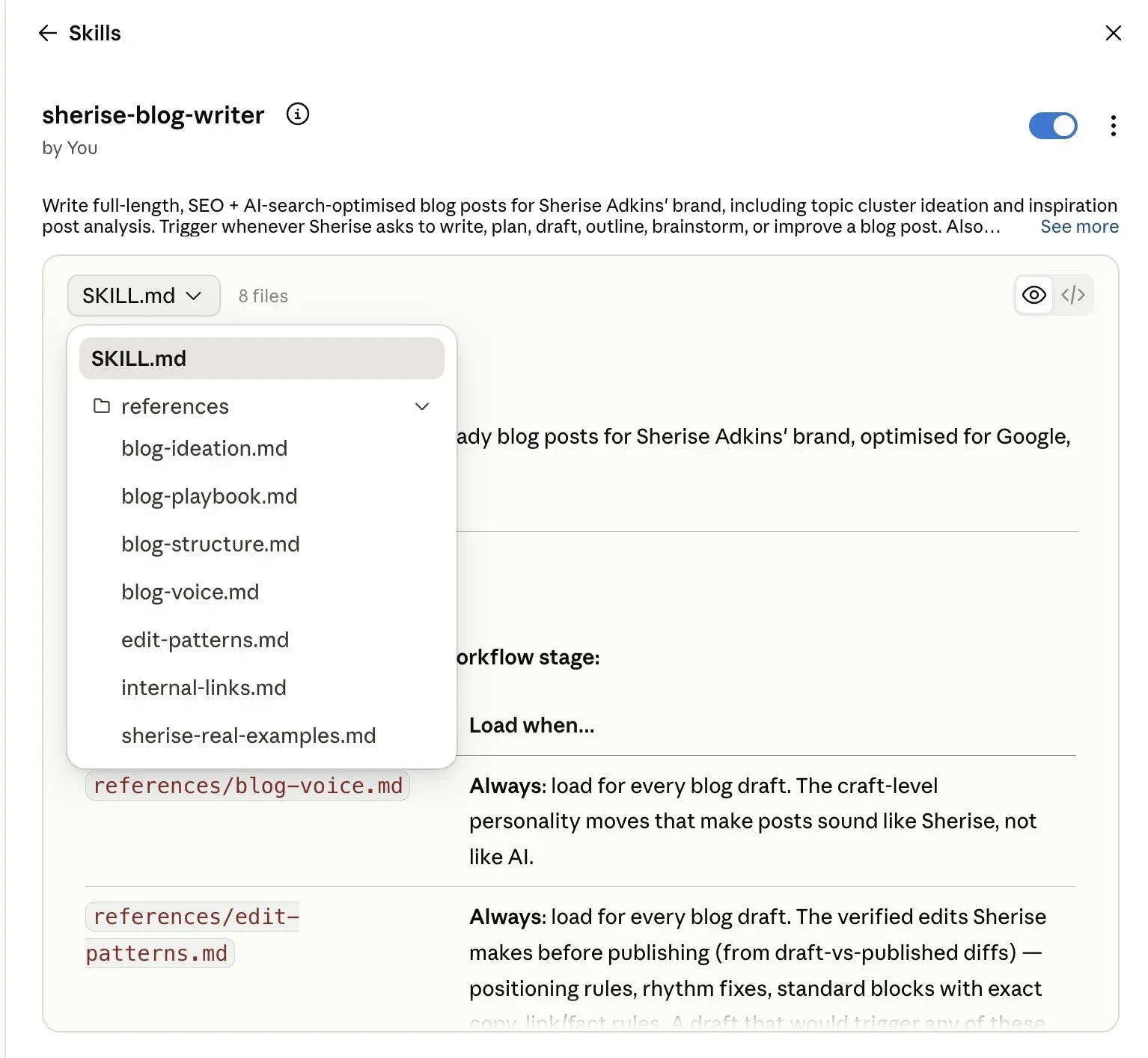
What I really love about Skills is that you don't go and get a Skill. Claude does. It reads what you've asked for, works out that your Skill is the right one for the job, and pulls it in without being told. Anthropic's own guidance puts the weight exactly there: a specific description is what tells Claude when to invoke your Skill.
Which is a bit magic, and also the whole reason the description matters so much. More on that shortly, because it's where nearly everyone's first Skill quietly dies.
Skills are available on Free, Pro, Max, Team and Enterprise plans, and they need code execution switched on in your account, which is the bit that catches people. They work across chat, Cowork and the Microsoft 365 add-ins, and in beta in Claude Code and the API. You'll find them under Customize, then Skills.
If you want the full anatomy and the install walkthrough, how to use Claude Skills covers it properly. This post is about the harder question underneath it: what to put in one, and how to actually make the thing.
When Is Something Worth Building Into a Skill?
The test I'd apply is repetition.
A lot of people go looking for their most impressive process, the big signature methodology, and try to build that first. Completely understandable, and completely the wrong place to start. The big one is usually the one carrying the most judgement calls and the most exceptions, so writing it down properly takes an afternoon you were never going to have. You stall halfway. The folder sits there unfinished, making you feel a bit worse every time you notice it 🙃.
These are the three questions I’d actually start with:
Do you do it more than once a month? Under that and you'll spend longer building the Skill than you'll ever save.
Do you do it roughly the same way each time? A task where every instance is genuinely different has no pattern to capture.
Would you notice if it came back wrong? If you can't tell good output from bad here, you can't test the Skill, and an untested Skill is worse than none.
Anything that passes all three is a candidate. Notice that "is this impressive" isn't on the list.
The boring ones pass this test constantly. The impressive ones often don't. Formatting a set of notes the way you like them. Turning a rough transcript into something readable. Writing the same kind of client update you've written ninety times. None of that will make a good Instagram post. All of it is exactly what a first Skill should be.
Start with the one you'd be embarrassed to admit you still do by hand.
What Should You Build Your First Skill From?
Build it from the task you currently have to keep explaining, whether it’s to a contractor or AI itself.
If you've recorded the same walkthrough three times or explained the same thing to AI over and over, you've already proven three things at once:
The task recurs
It has a describable method
The method lives in your head instead of anywhere useful
That's a Skill with the research already done.
Most of us have six or seven processes sitting entirely in our own heads, and the reason none of them got documented isn't laziness. Writing an SOP is genuinely miserable 🥴. You have to recall every step, get them in order, catch all the fiddly exceptions, then keep the thing current every time the process shifts. Nobody is doing that on a Tuesday afternoon.
The second place to look is a framework you already trust. Turn that into a Skill that applies the framework to your specifics: your offers, your clients, your pricing, your voice.
Which is a very different move from installing someone else's ready-made Skill pack, and I'll be honest, I'd send you to the first one every single time. A pack somebody else built encodes their judgement about their business. Useful for them. The version you build encodes yours, and the entire reason a Skill is worth the hour is that it carries your thinking rather than a stranger's.
Two sources, in order: the thing you keep re-explaining, then the framework you already run on.
What Actually Goes Inside a Skill
Every Skill has a name and a description at the top of it. Claude reads that description to decide whether your Skill is relevant to what's just been asked. Write what the job is, when it applies, and what sets it off, and it turns up.
Under that, the instructions. The thing to get down is the part that would go wrong if someone else did the task:
The steps, in order, including the ones you'd think are obvious.
The decisions you make without noticing. Where you'd choose one approach over another and why. This is the actual value, and it's the bit that never makes it into an SOP.
What good looks like. An example of a finished output beats three paragraphs describing one.
What to never do. Your hard rules. The mistakes you've already made once.
That third and fourth item are where a Skill stops being a to-do list and starts being a system, and this is the bit I'd argue with someone about. Anyone can list steps. Steps are the easy half and they're what everybody writes. What separates a Skill that works from one you end up correcting every time is whether you bothered to include the judgement, the calls you make so automatically you've stopped noticing you make them.
Inside SheScaleswe unpack the best way to build your your skill for your specific purpose, and each month I pull apart a real system I have running in my business and hand it over to you to customise for yours.
How to Build and Edit a Skill
You don't write the file. You talk to Claude, and Claude writes the file.
That is the bit I wish someone had said to me at the start, because I assumed building a Skill meant opening a blank document and getting the formatting right. It doesn't. There are four ways in, and three of them are just a conversation.
Sort this one thing before any of them, or nothing will run. Skills need code execution switched on in your account. Code execution is the setting that lets Claude build and hand back actual files instead of only writing text into the chat, and it's the same switch behind Claude making you a spreadsheet or a Word document. On Free, Pro and Max it's Settings, then Capabilities, then check that "Code execution and file creation" is on. On Team and Enterprise it sits in Organization settings and an owner has to flick it. Anthropic lists it as a prerequisite rather than an error you will ever see, so it's worth two minutes now instead of an hour of wondering later.
Option 1: Start from scratch
Open a new conversation and tell Claude you want to build a Skill. Something like:
I want to use your skill creator to build a new skill. I want this skill to help me [describe the task and the outcome].
Claude switches into interview mode and starts asking you questions. What should the Skill do? When should it activate? What does a good output look like? What should it avoid? What format do you want the result in?
Answer those properly. Don't rush them. This is where the quality actually gets decided, and the quality of your answers sets the quality of the Skill, one for one. Everything in the section above is what a good answer sounds like, which is why it comes first.
Option 2: Turn a conversation into a Skill
This one is my favourite, and most people already have three of these sitting in their history without realising it.
You've just had a really good working session. You spent thirty minutes getting your email sequence right, or you finally got Claude to nail your carousel structure after a few rounds of feedback. Instead of closing that conversation and starting from zero next time, you say:
Can you please help me to turn this into a skill so that next time we need to do this you know exactly how to?
Claude pulls the workflow out of the conversation. The steps, the corrections you made along the way, the input and output patterns, all of it, and packages the whole thing into something reusable.
You're capturing your best work and making it repeatable, which is a very different job to writing a process from a blank page. The thinking is already done. It's sitting in the chat.
Option 3: Record a Skill
If you’re on a Mac and use Claude Cowork, you can actually record a Skill. Recording a Skill takes about as long as doing the task once, because that's all you're doing. Recording needs Claude Cowork on a Mac and a Pro, Max or Team plan, and it isn't available on Free.
Two quick things to sort before your first one: make sure you're on the latest version of Claude for Mac, and say yes to the two macOS permissions it asks for, Accessibility (so it can follow your mouse and keyboard) and Screen Recording (so it can see your screen). It'll prompt you for both, and it may want a restart.
You start a recording inside Cowork in Claude for Mac, do the job the way you normally would, and talk through what you're doing as you go. Claude watches the screen, follows the steps, then hands back a proposed Skill for you to review and save. The recording runs about ten minutes, and you'll get a countdown when you're near the end.
For full instructions on how to record a Skill, How to Record a Skill in Claude covers it in full detail.
Option 4: Improve one you've already got
A Skill that's close but not quite right doesn't get rebuilt. You tell Claude what's wrong with it:
I want to improve my [skill name] skill. Here's what it's getting wrong...
Claude reviews the Skill, finds the gaps, and proposes revisions. You can also just name something you want in the output from now on, and it will add that to the Skill and repackage it for you.
Skills aren't set and forget. They get better the more you use them and feed back what isn't working, and that loop is the whole reason a Skill beats a saved prompt.
Where it ends up. Whichever route you take, the finished Skill lands in Customize, then Skills, with a toggle next to it. Turn it on and it's live across your conversations.
And yes, you can write the file by hand. A Skill is a folder with a SKILL.md file in it, and Anthropic publishes the full authoring spec and a set of example Skills if you ever want to go and read one. I'd not start there. It's the hardest possible route into something Claude will do with you in a ten minute conversation.
If Claude isn't set up properly underneath, a Skill lands on shaky ground.
Getting Claude set up so it can actually reach your tools is the whole difference between a clever chat box and something that runs jobs for you while you get on with your day.
This free kit walks you through the settings, the folders, and the setup that makes it all work.

How to Test a Skill Before You Trust It
A Skill you haven't tested is a guess with a filename.
Testing one is far less formal than it sounds, and you don't need a process for it. Once it's saved and toggled on, go and make the request the normal way, in your own words, the way you'd actually type it on a busy morning when you're half thinking about something else. Don't name the Skill. The whole point is finding out whether Claude reaches for it without your help.
THREE THINGS TO WATCH, IN THAT ORDER:
Did it load at all? If Claude answered without touching the Skill, the description is your problem and the instructions are fine. Open up Claude's thinking on the response and you'll see whether it actually reached for the Skill, which is a lot more reliable than guessing from how the answer looks.
Did it follow the steps, or improvise around them? Where it improvised, you left a gap. Something you knew and never said.
Did it get the judgement calls right? This is the real test. The steps are easy to check. Whether it made the same call you'd have made is the thing worth reading closely.
Then tell Claude what it got wrong and ask it to fix the Skill. It revises and repackages the thing itself, which takes about as long as typing the complaint.
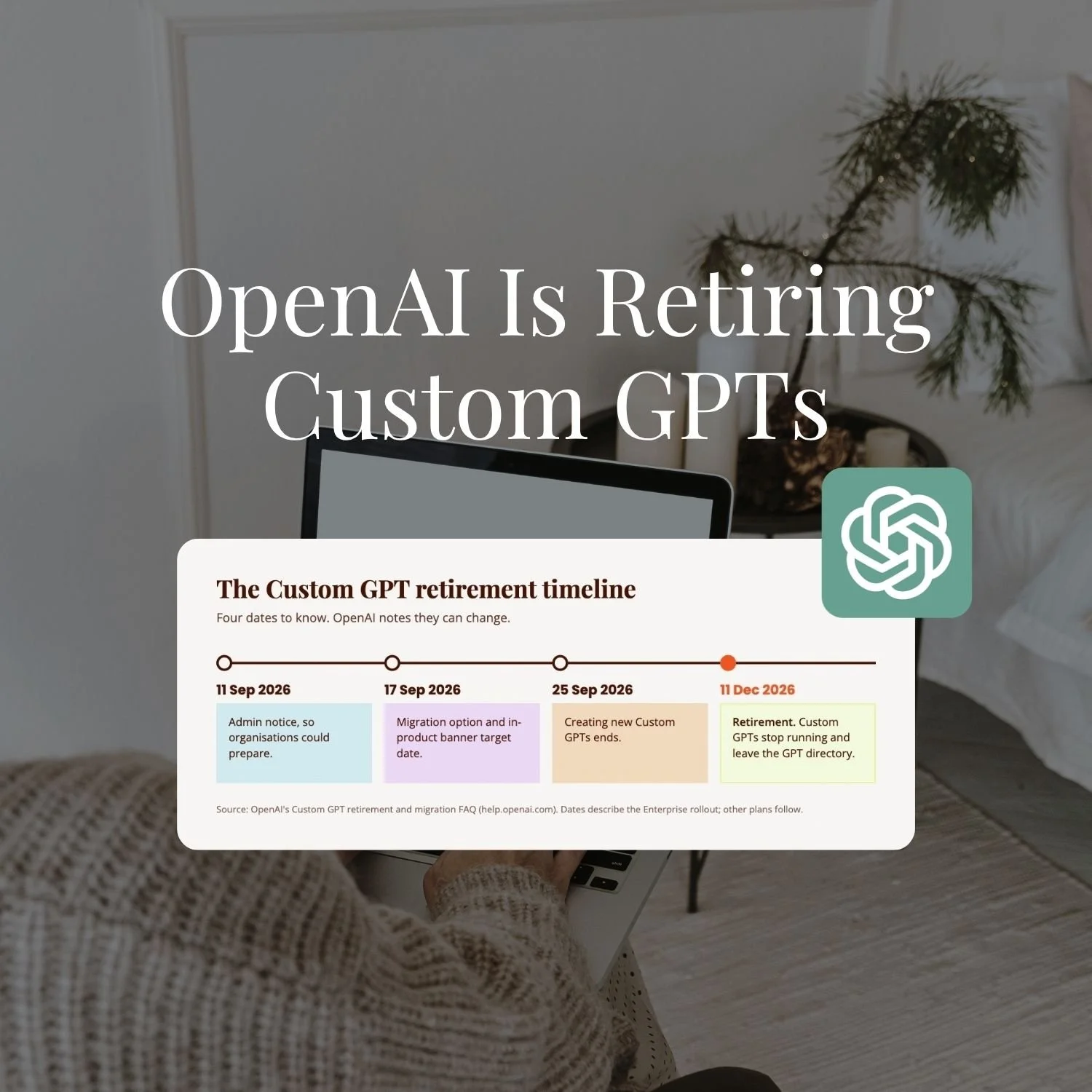
For what it's worth: my own first proper Skill was an Instagram caption writer, and I built it from a GPT I already had. Converting a GPT into a Skill turned out to be a steep learning curve. It had to be tested vigorously and it took about four rounds of changes before it held.
Four rounds, on something I'd already built once in another tool. So if yours doesn't hold on the first go, that isn't a sign you've done it wrong. The second round is much quicker anyway, because you're patching gaps rather than starting over.
One habit worth keeping, and it's the one that separates people who get value out of Skills from people who don't: when the Skill gets something wrong in real use months later, fix the Skill, not the output. Correcting the answer in the chat feels faster and it's gone the moment the conversation closes. Correcting the Skill holds for good, and you only ever pay for it once.
Key Takeaways
The short version of everything above:
You don't write the file, Claude does. Tell it you want to build a Skill and it interviews you, then writes and packages the thing itself. No code, no formatting, no blank document.
The easiest first Skill is a conversation that already went well. Say "turn this into a skill" and Claude lifts the workflow out of it, corrections and all.
Turn on code execution first. Settings, then Capabilities. Skills don't run without it and nothing tells you that's why.
Pick by repetition. More than monthly, roughly the same each time, and you'd notice if it came back wrong. All three, or leave it.
The description decides whether the Skill ever runs. Claude reads it to work out relevance, so name the trigger rather than the topic.
Nothing is finished. Tell Claude what a Skill is getting wrong and it revises and repackages it. That loop is why a Skill beats a saved prompt.
Frequently Asked Questions
Do I need to know how to code to build a Claude Skill?
No, and you don't need to write a file either. You tell Claude in a conversation that you want to build a Skill, it interviews you about the task, and it writes and packages the Skill itself. Everything you supply is plain English description of how you do the job. Skills can have executable scripts attached for advanced cases, and most people building their first one never go near that.
How do I actually create a Claude Skill, step by step?
Open a conversation and tell Claude you want it to build a Skill, describing the task and the outcome you want. Claude interviews you, asking what the Skill should do, when it should activate, what a good output looks like and what it should avoid, then writes and packages the Skill for you. You never touch the file. Two shortcuts on that: if you've just had a good working session, say "turn this into a skill" and Claude lifts the workflow straight out of the conversation, and if a Skill is close but wrong, tell it what it's getting wrong and it revises the Skill itself. Code execution has to be switched on in Settings, then Capabilities, before any of it runs.
Which Claude plans include Skills?
Skills are available on Free, Pro, Max, Team and Enterprise plans, and they require code execution to be enabled in your account. They work across chat, Cowork and the Microsoft 365 add-ins, and in beta in Claude Code and for API users. The Record a Skill feature is narrower: it needs Pro, Max or Team and only runs in Cowork in Claude for Mac.
Why isn't my Claude Skill running?
Two usual causes. The first is code execution being switched off in your account, which stops Skills working entirely and never shows you an error saying so. The second is the description: Claude reads it to decide whether the Skill applies to what you've just asked, so a vague one means the Skill sits there through every request that needed it. Tell Claude what it's getting wrong and ask it to rewrite the description to name the specific job and when it applies.
How do I make Claude use my Skill?
You don't. Claude reads your request, recognises that the Skill applies, and pulls it in on its own. That's the whole point of the format. If a Skill isn't loading when it should, the description is almost always why.
What should my first Claude Skill be?
The task you keep having to explain, whether that's to a contractor or to AI itself. Repetition proves the task recurs and has a describable method. The second-best option is a framework you already trust, turned into a Skill that applies it to your own offers, clients and voice.
What's the difference between a Skill and a Claude Project?
A Project holds the context for a body of work: your files, your business background, an ongoing thread. A Skill holds a method, and it travels with you across every conversation rather than living inside one Project. How to build a Claude Project covers the Project side in full.
What to Do Next
Your first Skill is the one that teaches you what the format is for. The second one is where it starts paying you back, because by then you know what to say and what to leave out.
If the underneath layer isn't sorted yet, Claude Unlocked covers the full setup: Projects, Skills, Cowork and how each one earns its place in a solo business.
It's $47 and takes an afternoon.
And if you'd rather watch it happen on a real build than a tidied-up example, that's what we do inside SheScales every month: one real system from my own business, pulled apart piece by piece, every component handed over, including the Skill files themselves.
Pick the boring task. Let Claude build it badly. Tell it what's wrong, twice. That's genuinely the whole method 🙂.
MEET THE AUTHOR

HEY, I'M SHERISE
I'm an AI strategist and educator based on the Central Coast of NSW, Australia. I help solo founders install AI systems that scale their business without scaling their workload and remove low-value work from their business so they can spend more time in strategy, creativity, and the work that actually moves the needle.
I run SheScales, the AI implementation community built for the person who IS the business and the whole team. I'm the founder behind 40+ AI assistants across ChatGPT and Claude, the Brand Playbook App, and a growing library of skills and systems used daily by hundreds of solo businesses.
I teach the Architect Method: the shift from chatting with AI to giving AI a job. It's the thinking framework for spotting where AI can genuinely help in your business, knowing how to architect the system, and deciding whether something should be a Skill, a Project, a GPT, an automation, a combination of these, or stay manual.
I'm not here to inspire you. I'm here to hand you the architecture.