Claude Cowork Scheduled Tasks: The Work That Runs Before I Open My Laptop
Last updated August 2026
The first time I set a job to run on a schedule, went to bed, and woke up to it already done, I sat there staring at the screen like someone had broken in overnight and tidied up (not even a joke) 🤯.
I was genuinely excited because it showed me that for the first time it looked like work was going to come off a solo founder's plate properly, not just come off faster.
For a scheduled task in Claude Cowork, you write the job down, give it strict rules about what it can touch and what it absolutely cannot, and tell it when to go. Then it goes, and you are not there.
That one shift changed the shape of my business, and it changed how I teach AI to solo founders too.
A Claude Cowork scheduled task is a job that runs on a timer without you starting it. The hard part is not setting one up, it is working out which jobs qualify: the ones you repeat, that need almost no judgement from you, and that you would notice if they stopped. I’ll show you exactly how to figure that out and more in this post.
TL;DR:
Setting one up takes minutes. Choosing what deserves to be scheduled is the actual work. That is where people stall.
Don't start with the impressive candidate. Start with the small admin-heavy thing you have been procrastinating on for months.
The intern test settles it. If you could explain the job to an intern and they could go and do it, it can be a Claude Cowork scheduled task.
A job qualifies if it passes three tests: you repeat it, it needs little judgement, and you would notice if it stopped. Fail any one and it belongs in a chat.
A scheduled task with no connectors has nothing to reach. One connector plus one trigger is the whole working shape.
Bloat is what kills these, not setup. Set them up to send you only what you will actually read.
New here? This blog is for the solo founder who wears every hat in the business and wants real AI systems and workflows running things, not just piecing it together in the chat. Start here →
Here’s what we’ll be covering:
What Does a Claude Cowork Scheduled Task Actually Do?
A Claude Cowork scheduled task is a job that fires on a timer, does the work inside your actual files and connected tools, and leaves the result somewhere you will find it, or actions something in one of your tools so you don’t have to.
Nobody writes a prompt that morning. Nobody opens a session.
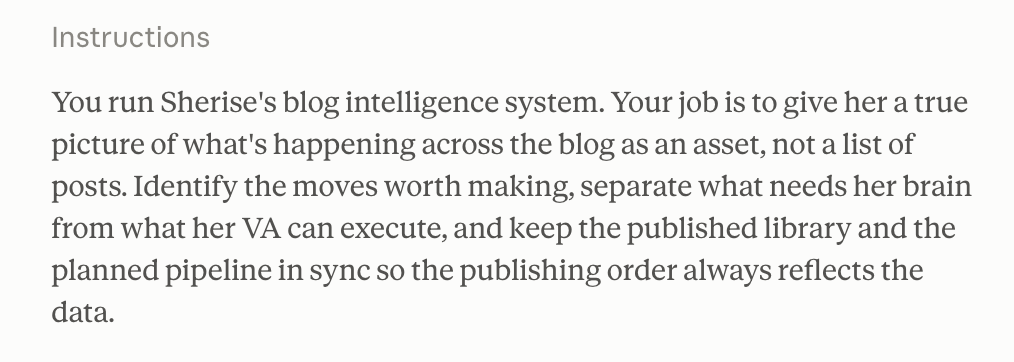
Every Monday morning, one of mine goes and pulls the traffic and search numbers for every post on this blog, compares this week against last week, and writes me a list of what climbed, what slipped, and what to fix on the ones that slipped. By the time I have coffee it is sitting there waiting. I asked for it once, months ago and now it runs every week.
That last part is the bit that took me a while to properly feel. A normal Claude chat, even a very good one, still waits for you. You open it, you ask, it answers. A scheduled task has already happened by the time you remember it exists.
If you haven't set Cowork up yet, start here with what Cowork actually is, because the rest of this assumes it's running and pointed at your files.
Scheduled tasks are what the setup was for.
Why Is It So Hard to Know What to Schedule First?
Most people go looking for the impressive candidate AKA the huge multifaceted job that would usually take an entire week and multiple people, and that is exactly why they never schedule anything. They scan their business for the big clever automation, find nothing worthy of it, and close the tab.
I say this constantly inside SheScales: I don't look at the big impressive jobs first. I look at the small ones. The admin-heavy stuff. The things that are boring and eat your time on repeat. The jobs I've been putting off for so long that the procrastination itself has become a feature of my week.
The rule I actually use to figure out if a task is a good candidate for a scheduled task is the intern test. Could you explain this job to an intern, properly, in a few minutes... and would they then be able to go and do it? If yes, it's a candidate. If explaining it would take an hour and they'd still get it wrong, it isn't.
That test does something the "what should I automate" question never does. It stops you assessing how impressive the job is and starts you assessing how explainable it is.
The Three-Part Test for Spotting a Scheduled Task
A job is a good scheduled task if it passes three tests:
You repeat it on a rhythm. Weekly, daily, monthly, first of the month. If it happens once, it's a chat, not a task. If it happens repeatedly it’s a task.
It needs almost no judgement from you. Gathering numbers, checking what changed, pulling the same five things into the same shape. If the job needs you to make a call halfway through, it isn't ready to run alone. It can become one later, once you've written down how you make that call.
You would notice if it stopped. This is the one that filters out the busywork you invented. Plenty of things you repeat wouldn't actually be missed. If it vanished for a month and nothing changed, automating it just makes the pointless thing faster.
Run those three over your week and start with the tasks that meet all 3 of these tests.
The Connector Is What Gives the Task Something to Do
A scheduled task with no connectors is Claude turning up to a desk with no logins. It knows the job. It can't reach anything to do it with.
What I often see is people switch Cowork on, feel underwhelmed, and decide it was overhyped, when what actually happened is they hired someone and gave them access to nothing 😬.
One connector plus one trigger equals one job you never do again:
Gmail plus a daily trigger. At six in the morning it opens the inbox, reads what came in overnight, works out which ones genuinely need a reply, and writes each one. They land in drafts. You read, edit, send.
Your sales platform plus a three-times-a-day trigger. It checks what sold since it last looked and writes you one line: what went, how many, how much. You stop opening the dashboard to check.
Analytics plus a Monday trigger. It pulls the week's Blog traffic and search numbers, sets them against last week's, and tells you which pages climbed, which slipped, and what to fix on the ones that slipped.
With these you're answering two questions: what does it need to reach, and when should it go.
If you haven't connected anything yet, start with which connectors are worth setting up first. One is enough to begin. If you want the full ranked list, here are the ten I actually use.
The Cowork Setup Kit covers the part that has to be right before any of this runs cleanly: pointing Cowork at the right folder, the settings worth turning on, and the guardrails to put in place before you give it access to anything.
It's free, and it's the guide I built because there wasn't one.

The Scheduled Tasks I Actually Have Running
The first one I ever set up was my daily email replies because my inbox was my single biggest bottleneck and the thing I most dreaded opening.
It drafts, it doesn't send. I read every one and most get edited. Starting from a draft instead of an empty reply box changed how long my inbox takes by a genuinely silly margin, and it’s great for my ADHD brain.
The blog report, every Monday. It pulls live Google Analytics and Search Console data for every published post, compares this week to last, and writes up what's ranking, what's slipping, and what to fix. This is the one behind my blog clicks going from 463 to just over 1000, across two consecutive twenty-seven day windows.
The sales logger, three times a day. Six in the morning, midday, six in the evening, it logs what sold. I never go and look. 😅
The monthly backup. Every skill, project, scheduled task and assistant written into Notion with version history. The unglamorous category. It has never once been interesting and I'd be in real trouble without it.
Plus genuinely so many more (last count I had over 30).
But I want to warn you about something I got wrong with scheduled tasks before I started so you don’t make the same mistake.
When you set these up you get excited. Oh, it could do this. And this. And this as well. So you build all of it, and then all of it starts arriving, every morning, and within a fortnight you aren't reading any of it.
I promise you that that isn't a scheduled task problem. That's a bloat problem, and bloat is what makes a system break, or makes you stop using it.
The one that broke first for me was my Daily Pulse scheduled task. I’ve paused it. It was giving me far too much information and I was skimming it at best, which is worse than not having it. It needs refining down to only the things I actually need to read before it comes back on.
So now I set these up around what I genuinely want to receive. The things I need, and none of the extras. Fewer, smaller, actually read.
Yours will look nothing like that list, and it shouldn't. Mine is shaped like a business that publishes constantly, so it's mostly content and numbers. If you run a service business, the same three tests land you on client onboarding checks, a weekly capacity look, or the follow-ups that go cold when you get busy.
Inside SheScales this is the sort of thing we pull apart together, the whole blog report handed over as a working file rather than described, so you can see why each instruction is worded the way it is.
What Should You Never Schedule?
Anything that sends, posts, publishes, pays or promises shouldn't run without you, no matter how well the task is written.
The way I look at it…
If the task gets something wrong and the worst outcome is that I read a bad report and roll my eyes, schedule it. If the task gets something wrong and a client, a customer or my email list sees it, it stays manual, or it drafts and I approve.
You can still schedule parts of these, though, so don’t rule them out completely. The rule isn't "keep the whole job manual". It's "keep the human in the loop at the point where it goes out". The email replies get written on a timer and wait in drafts. The content gets drafted on a timer and waits. Everything up to the send is fair game.
The other one to leave alone is anything that takes real judgement. If you can't yet write down how you make the call, Claude can't follow it, and what comes back is a confident version of the wrong decision. That isn't a task I'd schedule.
Automate the gathering. Keep the deciding.
How to Set Up Your First Claude Cowork Scheduled Task
Pick the boring weekly thing you currently do about half the time, run it by hand once with Claude watching, then put that exact job on a timer. Here's the whole thing, start to finish.
Pick the job using the intern test. Small, repeated, explainable. Not the impressive one.
Connect what it needs to reach. If the job lives in Gmail, connect Gmail. A task with nothing connected has nothing to do.
Run it by hand once, in Cowork, as a normal task. Explain the task properly. What to do, where to look, what to produce, and the rules about what it must not touch. Be specific about what you want back, because this is where bloat gets in. Watch it execute the task and correct anything it gets wrong.
Turn it into a scheduled task. In the same chat, ask it to now turn this into a scheduled task and set the schedule.
Pay attention when the task runs. If you’re happy with it, great. If you aren’t, go ahead and update the instructions.
One thing worth knowing before you build: if the task needs to touch files on your computer, the Claude desktop app has to be open when it fires. A task set for six in the morning on a closed laptop doesn't run. Anything that only touches connected apps like Gmail, Drive or Notion runs fine without it.
And the whole thing rests on context. A scheduled task inherits whatever Claude already knows about your business, which is why setting Cowork up so it knows your business matters more than the task wording does. A well-written task with no context behaves like a temp nobody briefed.
Key Takeaways
The short version:
The barrier is choosing, not setting up. Scheduling takes minutes. Working out what deserves it is the real work.
Go small first. The admin-heavy job you've been procrastinating on beats the impressive one you can't explain.
The intern test is the shortcut. Explainable in a few minutes and they could go do it? Then it's a candidate.
Three tests decide it: you repeat it, it needs little judgement, you would notice if it stopped. All three or it stays a chat.
One connector plus one trigger equals one job you never do again. Cowork with nothing connected is someone with no logins.
Bloat is the real killer. Set them up to send only what you'll actually read, or you'll stop reading all of it.
Keep the human at the point it goes out. Draft on a timer, send yourself.
Frequently Asked Questions
What is a Claude Cowork scheduled task?
A job that runs on a timer inside Claude Cowork without you starting it. It works with your actual files and connected tools, then leaves the result where you can find it. The difference from a normal Claude chat is that nobody has to open a session for it to happen.
What should I automate first in Claude Cowork?
Something small and admin-heavy that you already repeat, rather than the most impressive job you can think of. The quickest filter is the intern test: if you could explain the job to an intern in a few minutes and they could go and do it, it's a good first scheduled task.
How do I know if a task is right for scheduling?
Three tests. You repeat it on a rhythm, it needs almost no judgement from you, and you would notice if it stopped happening. If it fails any one of the three, keep it in a normal chat for now.
Do scheduled tasks work if my laptop is closed?
Only if the task stays inside your connected apps like Gmail, Drive, Calendar or Notion. Anything touching files on your computer needs the Claude desktop app open at the moment the task fires, no matter where you set the task up.
Should a scheduled task be allowed to send emails or publish content?
No. Keep the human in the loop at the point it goes out. You can still schedule everything up to that point, so the email gets drafted on a timer and waits in drafts for you to send.
How many scheduled tasks should I have?
Fewer than you think. Two you trust beat nine you've stopped reading. Add the second only after the first has run cleanly for about a month.
What to Do Next
If you want to build workflows and systems like this alongside other people doing the same thing, that's SheScales, my AI implementation community where every month I take a real system running inside my own business, pull it apart, explain every decision including the ones that didn't work, and hand over every component so you can build your version.

I walk you through it on live calls, I'm in the community daily answering questions, and you've got a room full of solo founders building alongside you.
The kind of room where things actually get done instead of bookmarked.
MEET THE AUTHOR

HEY, I'M SHERISE
I'm an AI strategist and educator based on the Central Coast of NSW, Australia. I help solo founders install AI systems that scale their business without scaling their workload and remove low-value work from their business so they can spend more time in strategy, creativity, and the work that actually moves the needle.
I run SheScales, the AI implementation community built for the person who IS the business and the whole team. I'm the founder behind 40+ AI assistants across ChatGPT and Claude, the Brand Playbook App, and a growing library of skills and systems used daily by hundreds of solo businesses.
I teach the Architect Method: the shift from chatting with AI to giving AI a job. It's the thinking framework for spotting where AI can genuinely help in your business, knowing how to architect the system, and deciding whether something should be a Skill, a Project, a GPT, an automation, a combination of these, or stay manual.
I'm not here to inspire you. I'm here to hand you the architecture.