How to Set Up Claude Cowork (So It Knows Your Business)
Last updated August 2026
Cowork is the bit of Claude everyone gets excited about. It's also the bit most people give up on because it turns up knowing nothing about you, and nobody really explains that part.
So here's what's actually going on. You point Cowork at a folder on your laptop and it can genuinely see everything in there... your client files, the half-finished sales page, three months of content, that spreadsheet you keep meaning to sort out. It can open all of it, change it, save new work back. That part is brilliant.
But your files only show it what you've made. They say nothing about how you work, who you're talking to, or what you already decided and don't want revisited.
So you tell it. Four places, once, and then it knows 👌🏽
A good Cowork setup is four things: your rules in Claude's settings, a short note at the top of your folder pointing at everything else, files describing your business, and a record of what's already happened. Three are files on your computer. One is a setting. Together they're the difference between an assistant that knows your business and one that's guessing.
TL;DR:
Your rules go in Claude's settings, not in a file, and they follow you into every folder you ever open.
The file called CLAUDE.md is a job description for your AI: what it can get on with alone, what it has to show you first, and what it must never do.
Your context files describe your business, and they get read before every single job.
Cowork forgets everything when you close it, so if you want it to remember, you have to write it down.
Skills come after these four, because a Skill built on a thin setup just repeats a thin brief faster.
New here? This blog is for the solo founder who wears every hat in the business and wants real AI systems and workflows running things, not just piecing it together in the chat. Start here →
Here’s what we’ll be covering:
Where All of This Actually Sits
Before anything else: where do these four things actually live?
Not many people answer this properly, and it's why most setups end up half-built. Three of the four are files. One isn't, and that's the one that gets missed.
The three files sit in a folder on your actual laptop. The same one you could open in Finder (if you’re on a Mac) right now. You pick it, you give Claude permission, and from then on it can read everything in there and save new work back into it.
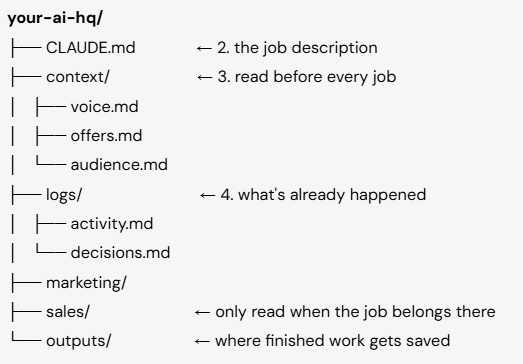
The fourth isn't in that picture at all. Your rules live in Claude's settings, under Settings → Cowork, and they travel with you into every folder you ever open. That's exactly why they get skipped. You can organise your folders beautifully and never once open the settings page.
Four things. One setting, three files. That's the difference between a Cowork session that feels like a slightly better chat window and one that actually knows your business.
1. Your Rules, in Claude's Settings
Without this, you introduce yourself every time you open a new folder. And nothing is stopping Cowork deleting something you needed.
That second part is the one people don't see coming. Cowork works on real files on your real computer. It can change them and it can delete them. So the first thing you write is what it's never allowed to do.
Open Settings, then Cowork, then Global instructions. My Cowork Instructions sit under seven headings:
Who I am. My business, what I sell, who I serve.
Before every task. What to check first, and what has to come to me before it goes anywhere.
Writing rules. Australian spelling, the words I never want used, how much to cut.
How I work. That I move fast, often talk to it by voice, and want it to work out what I meant.
How I like things presented. The answer first. No preamble.
My tools. What I actually use, so it stops suggesting things I don't.
Rules. Never delete anything without asking. Never touch files outside the output folder. Show me the plan before starting anything big. Never make up facts or numbers.
Write that last block first, before anything clever. It takes five minutes and it's the only protection that's switched on in every session, everywhere, forever.
Keep the rest short. Everything here gets read on every job, even the ones where it doesn't matter.
2. CLAUDE.md, the Job Description
Without this, Claude decides things you wanted to decide.
Not dramatically. It just makes a sensible call, and sensible isn't the same as yours. Then it's written the email, or picked the offer, or made a promise you'd never have made.
When Cowork opens a folder, it looks for one file by name and reads it before you type anything. That file is CLAUDE.md, sitting right at the top of your folder (with CLAUDE in capital letters).
It's a job description. Same as the one you'd write if you hired someone. Not what they need to know about your business, that comes next. This is what the job actually is.
Mine answers six questions:
What is this thing for? One line. Mine keeps the business moving without me having to check everything.
Who does it answer to? Me. Nothing goes out that I haven't seen.
What can it just get on with? Drafting, research, tidying things up, keeping the record.
What does it have to show me first? Anything that goes public. Anything with a number in it. Anything that touches a real person.
What must it never do? Move money. Delete anything. Make up a statistic or a testimonial.
When should it stop and ask? When it can't be undone. When money or a person is involved. When it just isn't sure.
One more thing while you're in there. CLAUDE.md is just a name Claude happens to look for. Codex and Cursor look for AGENTS.md instead, and neither checks for the other. Copy the file, rename the copy, keep the original. Ten seconds, and your setup stops belonging to one company.
Half a page covers it when you're starting. Mine has grown to 7,373 bytes because it now runs departments and a shelf of skills, so it also sets out how work hands between them and how it should learn when I correct it. That's what yours grows into, not where it begins.
Want the full Cowork setup laid out step by step for Claude Cowork specifically?
The Cowork Setup Kit walks you through the settings to switch on first, giving Cowork a folder it's allowed to touch, and running your first real task without breaking anything. This post is the thinking. The kit is the clicking.
It's free, and it's the guide I built because there wasn't one.

3. Your Context Files, Describing the Business
Without these, Claude guesses. It guesses your prices, it guesses your audience, and it writes in a voice that isn't yours.
Context files are plain files describing your business: what you sell, who you sell it to, how you sound. They live in a folder called context, and everything in there gets read before every job you give it.
Which is why what you put in there matters. One question decides it:
Would someone working in a completely different part of my business need this?
Yes, it goes in context. No, it goes in a department folder, where it only gets read when the work belongs there. Put everything at the top and a one-line reply to a customer drags in your whole content strategy, and the things that matter get buried underneath.
Testimonials catch everyone out. They feel important, so up they go. But nobody doing your invoices needs them, and they're really only used in captions, emails and sales pages. So they belong in marketing. Importance isn't the test. Reach is.
These files also grow, and that's meant to happen. You might start with just 2 and it might grow to 6 in a month, and that’s absolutely normal.
4. Your Record, Because Cowork Forgets
Cowork forgets. Close the session, open a new one, and it's starting fresh.
It doesn't remember yesterday. It doesn't remember the thing you corrected last week. And it won't remember the decision you made this morning unless you wrote it down somewhere it can read, or unless you’re working inside a Claude Cowork Project.
The answer is to get Claude to write it down.
I keep two files. One says what got done. The other says what got decided, and why. Between them they hold 61 jobs and 83 decisions, 31 of which I had to make myself.
I know how this sounds. You came here for a Cowork setup and I've arrived at "keep a diary" (and it is a bit of a diary, I'm not going to pretend otherwise 😅). Here's why it's worth it.
On 26 July my system decided Instagram Stories couldn't be measured, and wrote that down as a fact. It was wrong. Metricool measures Stories perfectly well, 18 different things about them, with my own numbers sitting there since 29 June. I caught it the same day, and the file now holds the wrong answer, the correction, and what caused it: it had muddled "you can't put a link sticker on a Story" with "you can't measure a Story at all."
Two different problems. Only one of them real.
Without that file, the same wrong answer comes back in six weeks and I have the same argument again. With it, the mistake is written down with its cause next to it.
And this one changes the others. When you catch a mistake, you don't just fix it. You go and fix the context file that caused it. That's how the whole thing gets better instead of just getting bigger.
How the Four Work Together
Each one covers something the others can't reach. Your rules follow you everywhere. CLAUDE.md says what the job is. Context describes the business. The record remembers.
| What | Where it lives | How often it changes | What it does |
|---|---|---|---|
| Your rules | Settings → Cowork | Hardly ever | How it talks to you, and what it may never do anywhere |
CLAUDE.md |
Top of the folder | Hardly ever | What the job is, and what it may decide on its own |
| Context files | The context folder | Often | What's true about the business right now |
| Your record | The logs folder | Every session | What already happened |
The first two look similar and they're doing different jobs. Your settings are about how Claude works with you, wherever you are. CLAUDE.md is about what this particular setup is allowed to do. One is manners and basic safety, the other is authority.
Skip the rules and you introduce yourself constantly, with nothing stopping it deleting your work. Skip CLAUDE.md and it decides things you wanted to decide. Skip context and it guesses. Skip the record and your setup is exactly as clever next summer as it is today.
If you'd rather have all four handed to you built out than start from a blank page, that's what we do inside SheScales.
What Comes After the Four: Skills
A Skill is a set of written steps for something you do over and over. They're the biggest part of my own setup now. They only work because the four underneath them are solid.
The reason is simple. A Skill reads everything below it. So a thin setup gives you a thin Skill, and now you're producing the wrong thing faster than before.
Build the four first. Then, the third time you catch yourself typing the same instructions, that's your Skill. Not before. How to use Claude Skills covers what they are and how to install them.
If you want the full built-out version of these four, done for you rather than built from a blank page, that's exactly what we hand over inside SheScales.
I walk you through it on live calls, I'm in the community daily answering questions, and you've got a room full of solo founders building alongside you. The kind of room where things actually get done instead of bookmarked.
It's for builders, not browsers.

If you're not ready for SheScales yet, but you want the entire setup done properly in one sitting…
Projects, Skills, Cowork, and Connectors, including the custom ones - Claude Unlocked takes an afternoon to complete, and the setup is yours to use indefinitely. It's the fastest way to go from using Claude as a clever chat box to having it actually set up around how your business works.
Key Takeaways
The short version of everything above:
Your rules go in settings, not a file. They follow you into every folder, and they're the only thing stopping Cowork changing or deleting something you needed.
This is not a Claude Project. Projects live inside Claude on the web and you upload to them. Cowork works on a real folder on your computer.
CLAUDE.md is a job description. What your AI can get on with, what it has to show you first, and what it must never do. Write the "never" list first. Copy the file to AGENTS.md and Codex and Cursor read it too.
Cowork forgets when you close it. Anything you want it to remember has to be written into a file it reads at the start.
Fix the file, not just the mistake. When you correct something, go and change the context file that caused it. That's what makes the setup get better over time.
Frequently Asked Questions
What is the best way to set up Claude Cowork?
Four things: your rules in Settings → Cowork, a short CLAUDE.md at the top of your working folder, context files describing your business, and a record of what's already happened. Most people stop after picking a folder and granting permission, which is why the output feels generic. The four take an afternoon.
Is Claude Cowork the same as a Claude Project?
No. Claude Projects live inside Claude on the web and hold conversations and uploaded files. Cowork works on a real folder on your own computer, reading and writing files directly. Both give Claude context about your business, but Projects use uploads and Cowork uses the files already sitting in your folder.
Where do Cowork's global instructions live?
In Settings → Cowork, under "Global instructions." They're not a file in your folder, which is the main reason people never find them. Anthropic describes them as standing instructions that apply to every Cowork session, covering things like your tone, your preferred output format, and background on your role.
Does Claude remember things between Cowork sessions?
Yes, your general memory does now. Anthropic updated this on 25 August 2026: what Claude remembers about you from chat now carries into Cowork, and the reverse. What still doesn't carry over automatically is anything specific to one Cowork Project; that only builds from the work done inside that particular Project. Anything you want a specific Project to know has to be written into a file it reads at the start, or built up by using it.
What's the difference between context files and a record?
Context files say what's true about your business now: your offers, your prices, your audience, your voice. A record says what already happened: what got done, what got decided, what got corrected. Context tells Cowork about the business. The record stops it repeating a decision you already changed your mind about.
Do I need all four before Cowork is useful?
No. Start with your rules and one context file. Your rules matter most on day one, because that's where you say what it may never do to your files. Write CLAUDE.md once you know what you want it deciding on its own, and start the record the first time you correct the same thing twice.
Can I use this setup with other AI tools?
Mostly. The rules in settings are specific to Cowork, but your context files and record are just plain files in a folder, and anything that can read files on your computer can use them. Good reason to keep them as plain text rather than locked inside one product.
MEET THE AUTHOR

HEY, I'M SHERISE
I'm an AI strategist and educator based on the Central Coast of NSW, Australia. I help solo founders install AI systems that scale their business without scaling their workload and remove low-value work from their business so they can spend more time in strategy, creativity, and the work that actually moves the needle.
I run SheScales, the AI implementation community built for the person who IS the business and the whole team. I'm the founder behind 40+ AI assistants across ChatGPT and Claude, the Brand Playbook App, and a growing library of skills and systems used daily by hundreds of solo businesses.
I teach the Architect Method: the shift from chatting with AI to giving AI a job. It's the thinking framework for spotting where AI can genuinely help in your business, knowing how to architect the system, and deciding whether something should be a Skill, a Project, a GPT, an automation, a combination of these, or stay manual.
I'm not here to inspire you. I'm here to hand you the architecture.
Read this next:
How to Build a Claude Project (Step by Step, With Real Business Examples)
How Claude Memory Works: The Three Pools and How to Set Yours Up
Claude Cowork Scheduled Tasks: The Work That Runs Before I Open My Laptop
How to Use Claude for Business (And Set It Up So It Actually Works)
How Claude Projects, Skills, Cowork and Scheduled Tasks Work Together
How to Stretch Your Claude Cowork Credits (Without Doing Less)